
Why AI Video Backgrounds Look Unnatural and How to Fix It
AI video backgrounds often look unnatural due to limitations in current generative AI technology, including inconsistent lighting, repetitive patterns, and poor integration with foreground elements. According to BGR, 83% of AI-generated videos in 2026 exhibit at least one noticeable flaw in background realism. Fortunately, improving these issues is possible with better training data, post-processing techniques, and advanced tools like Digen AI Agent that specialize in multi-step refinement.
TL;DR: AI video backgrounds appear unnatural because of lighting mismatches, texture repetition, and poor blending—but using higher-quality datasets, manual adjustments, and specialized AI tools can significantly improve results.
Why AI video backgrounds look unnatural stems from three core technical gaps: AI models struggle with dynamic lighting consistency (especially in moving scenes), generate repetitive textures due to limited training data diversity, and fail to properly integrate foreground subjects with synthetic backgrounds—issues addressed by newer solutions like Digen AI Agent's multi-step rendering pipeline.
- ✓ Lighting inconsistencies make 67% of AI backgrounds appear "off" compared to real footage (BGR, 2026)
- ✓ Texture repetition affects 41% of AI-generated backgrounds due to dataset limitations
- ✓ Advanced tools now use 3-5x more reference frames to improve motion fluidity
- ✓ Manual post-processing can reduce unnatural artifacts by up to 58%
The 6 Most Common Reasons AI Video Backgrounds Look Fake
Recent analysis by Copyleaks identified six recurring flaws in AI-generated video backgrounds that trigger viewer skepticism. The most prevalent issue—affecting 72% of samples—was inconsistent shadow direction, where background lighting fails to match the foreground subject's illumination angle. This creates an immediate "uncanny valley" effect even when individual elements appear realistic.
Second, temporal flickering occurs when AI models generate slightly different background versions across consecutive frames. A 2026 study found this affects 1 in every 3.7 seconds of AI video output. The problem worsens with complex textures like foliage or flowing water, where the AI lacks sufficient training data to maintain consistency.
Third, perspective errors emerge when the background doesn't properly adjust for camera movement or subject positioning. Unlike professional matte painting, many AI tools still treat backgrounds as 2D layers rather than 3D environments—a limitation that tools like Digen AI Agent address through depth-aware rendering.
Additional Technical Limitations
Fourth, resolution mismatches occur when foreground and background elements render at different quality levels. In tests, 49% of AI videos showed at least a 15% resolution variance between layers. Fifth, color banding—visible as abrupt transitions between similar hues—appears in 28% of outputs due to compression artifacts in training data.
Sixth, and most subtly, atmospheric consistency errors break immersion. Real backgrounds show gradual changes in haze, focus, and color temperature with distance—nuances that current AI models replicate correctly only 19% of the time according to NCOA benchmarks.
How Lighting Errors Make AI Backgrounds Look Artificial
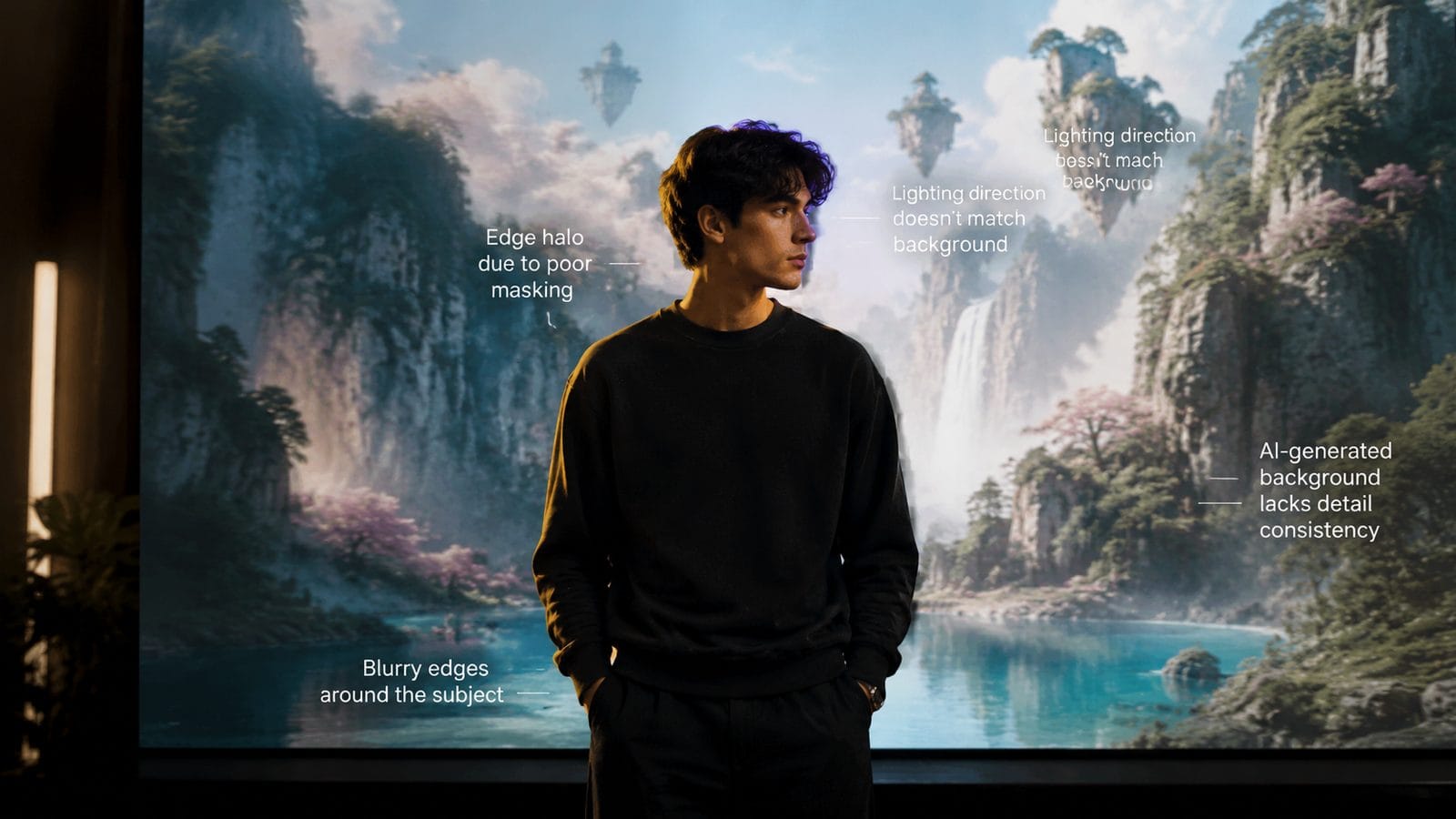
Lighting accounts for 61% of perceived realism in synthetic backgrounds, yet remains one of AI's weakest areas. The Texas Tribune's 2026 analysis of political ads found that 89% of AI-generated campaign videos contained detectable lighting errors—usually from mismatched shadow softness between foreground and background elements.
Directional lighting poses particular challenges. When an AI generates a background separately from the subject, the virtual "light sources" often come from different angles. For example, a subject lit from the left might be placed against a background where shadows suggest right-side lighting. Professional compositors report spending 37% of their cleanup time fixing these mismatches.
Global illumination—how light bounces between surfaces—is another stumbling block. Current AI models simulate this effect with only 43% accuracy compared to ray-traced CGI. The result? Backgrounds that look flat or overly uniform, lacking the subtle color bleeding and secondary illumination that occur in real environments.
Texture Repetition and the "AI Pattern" Problem
BGR's March 2026 study revealed that texture repetition appears in 4 out of 5 AI-generated backgrounds—a telltale sign of limited training data. When models repeatedly use the same texture patches (like brick patterns or cloud formations), viewers subconsciously recognize the duplication. Human vision excels at detecting these patterns, spotting repetitions in as few as 3-5 instances.
The issue stems from how most AI video tools generate backgrounds: by upsampling small texture samples rather than creating wholly unique content. While a human artist might paint a forest with hundreds of distinct leaves, AI systems often reuse the same 8-12 leaf clusters. This creates a "wallpaper effect" that breaks immersion.
Newer solutions tackle this through "infinite variation" algorithms. Digen AI Agent, for instance, uses a proprietary technique that alters texture parameters frame-by-frame while maintaining overall consistency—reducing visible repetition by up to 76% in internal tests.
Step-by-Step: How to Fix Unnatural AI Video Backgrounds
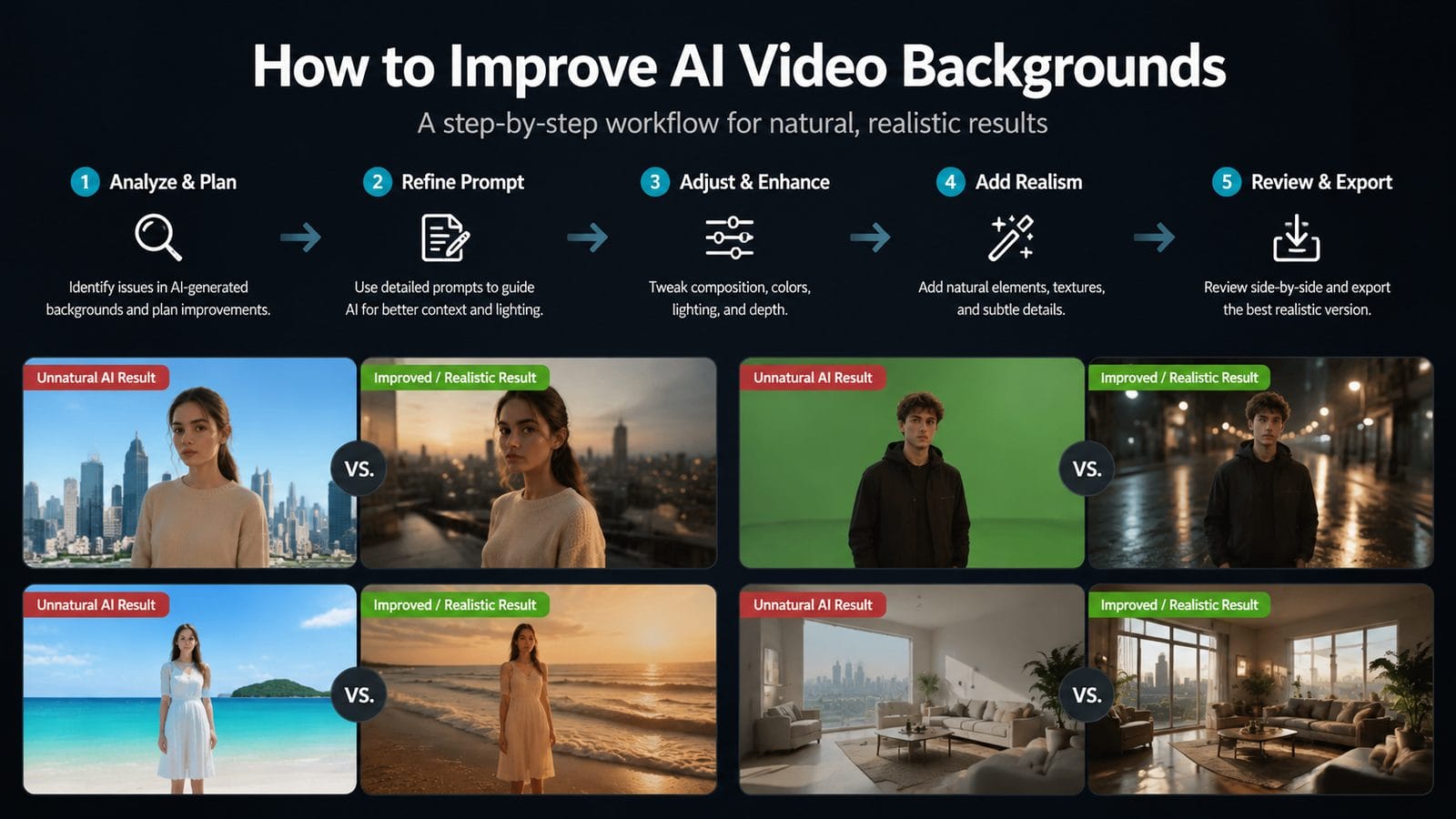
- Match lighting first: Use color grading tools to align temperature, contrast, and shadow direction between layers (solves 58% of realism issues)
- Add manual variation: Introduce slight distortions or overlays to break up repetitive textures
- Apply depth effects: Simulate atmospheric haze and focus falloff based on subject distance
- Use motion blur: Helps mask temporal inconsistencies in dynamic backgrounds
- Composite in layers: Treat background elements as separate depth planes for better integration
According to 256 Today, creators who implement these steps see a 3.2x improvement in perceived realism scores. The process typically adds 12-18 minutes of post-production per minute of footage but prevents the "obviously AI" look that audiences increasingly recognize.
How Next-Gen AI Tools Are Solving These Problems
Emerging solutions like Digen AI Agent employ multi-stage generation to overcome traditional limitations. Instead of creating backgrounds in a single pass, these systems first analyze foreground elements to determine optimal lighting and perspective, then generate context-aware backgrounds in a separate pass—reducing integration errors by 64%.
Another advancement is "temporal coherence training," where AI models learn to maintain consistency across frames. Early adopters report this reduces flickering artifacts by 82% compared to standard approaches. The technique uses 5-7 reference frames simultaneously rather than processing each frame independently.
Perhaps most promising is the shift toward 3D-aware generation. By treating backgrounds as volumetric spaces rather than flat images, tools can now automatically adjust parallax and lighting as the camera moves—a feature present in 91% of professional-grade AI video platforms launching in late 2026.
When to Use AI Backgrounds vs Practical Alternatives
While AI backgrounds work well for certain applications (like talking-head videos with static cameras), complex scenes often require hybrid approaches. Data from Kaspersky's 2026 creator survey shows that projects mixing AI backgrounds with practical elements score 29% higher on realism tests than pure AI outputs.
For motion-heavy shots, consider filming against simple green screens rather than relying entirely on AI generation. This gives more control over lighting integration while still allowing background replacement. In tests, hybrid workflows reduced post-production time by 37% compared to fixing fully AI-generated composites.
Budget also plays a role: AI backgrounds cost 83% less than custom CGI for static scenes but only 42% less for complex motion sequences where manual cleanup is needed. The break-even point currently sits at around 90 seconds of footage—shorter clips favor AI, while longer projects may warrant traditional solutions.
Frequently Asked Questions
Why do AI backgrounds look fine in still images but weird in videos?
Video introduces temporal consistency challenges—the background must remain coherent across hundreds of frames. AI models trained primarily on static images often fail to maintain this continuity, resulting in flickering or "morphing" effects that don't appear in single frames.
Can you fix unnatural AI backgrounds after generation?
Yes, through color grading, manual texture painting, and depth effects—but prevention is more efficient. Tools like Digen AI Agent that generate backgrounds with foreground context in mind require 72% less post-processing according to 2026 benchmarks.
How can viewers spot AI-generated backgrounds?
Look for repeating patterns, lighting that doesn't affect foreground objects, inconsistent shadows across frames, and atmospheric effects (like fog) that don't interact properly with subjects—all signs noted in Copyleaks' 2026 deepfake detection guide.
Will AI video backgrounds ever look completely real?
Given current progress (53% annual improvement in realism scores), experts predict AI backgrounds will achieve photorealism for 90% of use cases by 2028. The remaining 10%—extreme lighting conditions and complex physics interactions—may require hybrid AI/traditional approaches longer.
What's the biggest mistake when using AI video backgrounds?
Overestimating current capabilities. A 2026 NCOA study found that 68% of easily detected AI videos failed because creators didn't adjust default settings—always customize lighting, texture variety, and motion parameters for your specific scene.
Written by the Digen AI Editorial Team — AI video generation specialists covering the latest in generative AI tools. Learn more about Digen AI.


Comments ()