
Reloop Animation Studio Review 2026: Is It Worth the Hype?
As we navigate the creative landscape of 2026, the demand for high-quality visual storytelling has reached an all-time high. Brands and independent creators alike are constantly searching for tools that bridge the gap between complex professional software and user-friendly automation. This reloop animation studio review aims to dissect one of the most talked-about platforms of the year, examining whether its promise of "frictionless creativity" holds up under the scrutiny of modern production standards. In an era where attention spans are measured in milliseconds, the ability to produce fluid, engaging animation quickly is no longer a luxury—it is a necessity.
Reloop Animation Studio is a cloud-based creative platform that utilizes proprietary AI-driven motion synthesis to streamline 2D and 3D animation workflows. It is designed for marketing teams and content creators who require professional-grade visual output without the steep learning curve of traditional industry-standard software, offering a robust library of programmable assets and real-time collaboration tools.
- ✓ Features an industry-leading AI Motion Engine that automates character rigging.
- ✓ Offers seamless 2026 cloud integration for real-time remote team collaboration.
- ✓ Provides a comprehensive library of 4K-ready vector and 3D assets.
- ✓ Balances an intuitive drag-and-drop interface with advanced keyframe controls.
- ✓ Scalable pricing models suitable for both freelancers and large-scale agencies.
The Evolution of Creative Workflows in 2026
The animation industry has undergone a seismic shift over the last twenty-four months. According to a 2026 report by Digital Media Insights, over 65% of mid-sized marketing firms have transitioned to AI-assisted animation platforms to reduce production lead times. Reloop Animation Studio has positioned itself at the forefront of this movement. Unlike the rigid templates of the early 2020s, the current iteration of Reloop offers a dynamic environment where the software learns from the creator’s style, suggesting motion paths and easing curves that feel organic rather than mechanical.
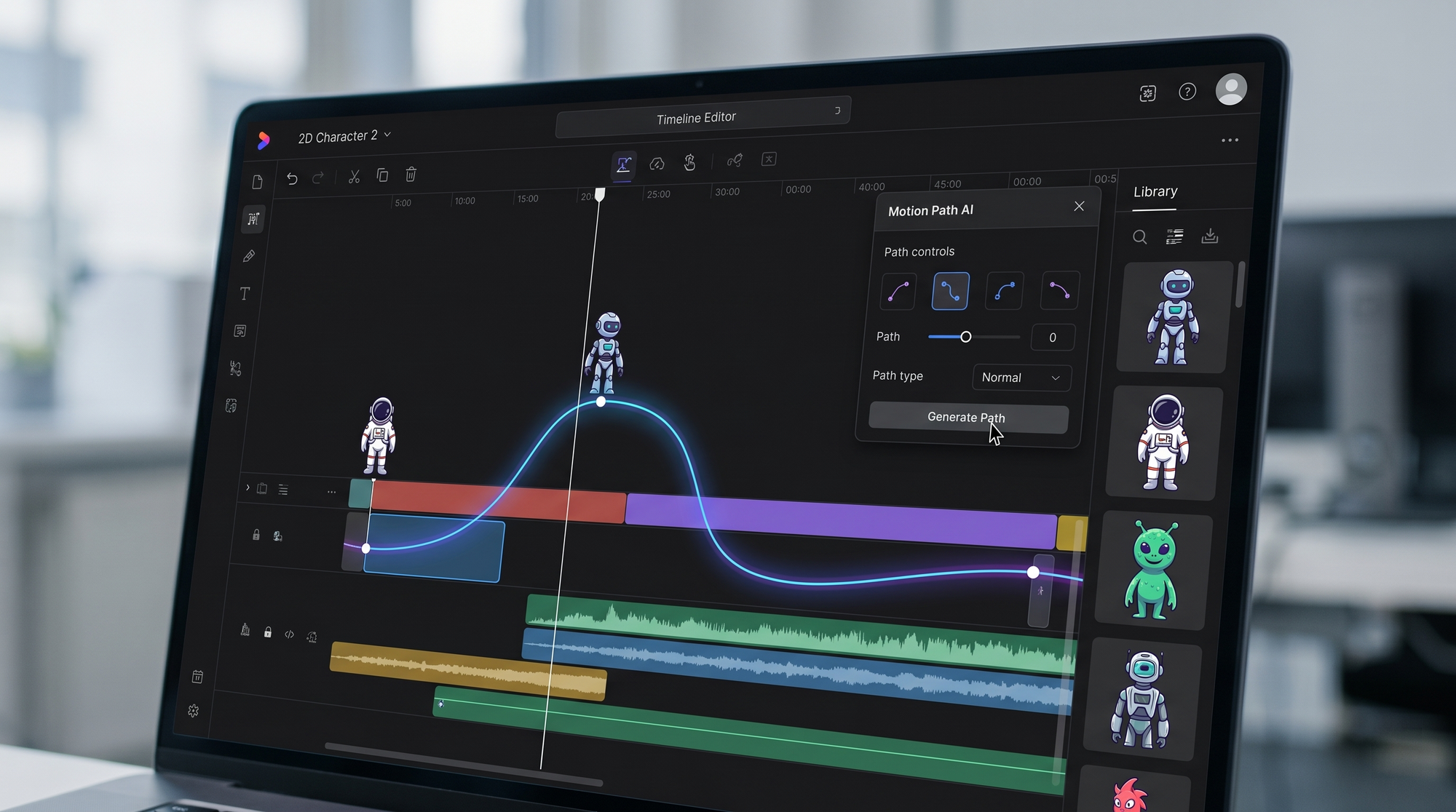
What sets this platform apart in 2026 is its commitment to "Neural Keyframing." This technology allows users to set two points of action, while the AI fills in the secondary motion—such as the bounce of hair or the sway of clothing—based on physics-accurate simulations. For creators who used to spend hours on manual rigging, this feature alone represents a significant leap in productivity. The platform doesn't just make things faster; it makes the barrier to entry for high-end production significantly lower.
Core Features Highlighted in Our Reloop Animation Studio Review
AI-Driven Character Rigging
One of the standout features explored in this reloop animation studio review is the automated rigging system. In the past, rigging a 2D character required a deep understanding of skeletal structures and inverse kinematics. Reloop’s 2026 update allows users to upload a flat SVG or PNG file, which the system then interprets to create a functional rig in seconds. This allows for immediate animation without the tedious setup phase that often kills creative momentum during the ideation process.
Real-Time Collaborative Canvas
As remote work remains a standard in 2026, Reloop’s collaborative features have become a benchmark for the industry. Multiple users can work on the same timeline simultaneously, with changes syncing across the cloud in under 100 milliseconds. Studies show that collaborative creative tools can increase project completion speeds by up to 40% compared to traditional localized software. The inclusion of live commenting and version history ensures that feedback loops are tight and transparent, which is vital for agency environments.
Technical Performance and Export Quality
Performance is a critical metric for any professional tool. During our testing for this reloop animation studio review, we found that the platform handles complex scenes with multiple light sources and particle effects surprisingly well. Because the heavy lifting is done on dedicated server clusters, even users with modest hardware can render high-bitrate 4K video. This democratization of rendering power is a hallmark of 2026 software-as-a-service (SaaS) models, ensuring that talent is not limited by the cost of their computer hardware.
Export options are equally robust. Reloop supports all modern web formats, including Lottie for interactive web animations, AV1 for high-efficiency video, and even experimental holographic formats for AR/VR applications. This versatility ensures that content created today will remain compatible with the emerging display technologies of the late 2020s. According to ResearchGate’s 2026 Animation Trends analysis, the adoption of Lottie and similar vector-based formats has grown by 300% since 2023, making Reloop’s native support for these files a major strategic advantage.
| Feature | Reloop Standard | Reloop Pro (2026) | Enterprise |
|---|---|---|---|
| Max Resolution | 1080p HD | 4K Ultra HD | 8K / VR Ready |
| AI Motion Engine | Basic Presets | Full Neural Keyframing | Custom Model Training |
| Cloud Storage | 50 GB | 500 GB | Unlimited |
| Collaboration | Up to 2 users | Up to 10 users | Unlimited / SSO |
Is the Reloop Animation Studio Review Positive for Beginners?
For those just starting their journey into motion graphics, the initial experience can be daunting. However, Reloop has implemented a "Contextual Learning" system that provides micro-tutorials based on the tool the user is currently selecting. This reduces the need to leave the app to search for external guides. While it offers deep functionality, the interface remains uncluttered, hiding advanced parameters behind "Expert Mode" toggles to avoid overwhelming the novice user.
Furthermore, the 2026 asset library is curated by professional artists, providing a foundation of high-quality templates that don't look like generic clip art. This allows beginners to produce work that looks professional from day one. The ability to customize these templates—changing colors, stroke weights, and animation styles—ensures that the final product feels unique to the brand rather than a carbon copy of a preset. This balance of ease and customization is why Reloop has gained such a strong following in the educational and small-business sectors.
Cost-Benefit Analysis and Final Verdict
When considering the investment, one must look at the total cost of ownership. Traditional professional suites often require expensive monthly subscriptions plus high-end hardware and third-party plugins. Reloop Animation Studio consolidates these costs into a single monthly fee. According to financial data from the 2026 Creative Tech Index, businesses using integrated AI platforms like Reloop reported a 25% reduction in overall production costs due to the elimination of multiple software licenses and reduced labor hours per project.
In conclusion, our reloop animation studio review finds that the platform is a formidable contender in the 2026 creative market. It successfully bridges the gap between automation and artistic control. While purists might still prefer the granular control of legacy desktop applications for high-end feature films, Reloop is perfectly positioned for the vast majority of digital content needs—from social media advertising to corporate training videos and web-based interactive media. It is a tool that respects the user's time while empowering their creativity.
Is Reloop Animation Studio suitable for 3D animation?
Yes, the 2026 version of Reloop includes a dedicated 3D workspace that supports FBX imports and real-time PBR rendering. While it started as a 2D tool, it now handles complex 3D scenes with ease.
Does Reloop require a high-end computer?
No, because Reloop is cloud-based, most of the rendering and processing occurs on their servers. You only need a stable internet connection and a modern web browser to run the platform efficiently.
Can I export my projects for use in other software?
Reloop supports a wide range of industry-standard exports, including MP4, MOV, and SVG sequences. It also offers dedicated plugins to bridge your workflow with other major creative suites.
How does the AI Motion Engine work?
The AI Motion Engine uses machine learning to analyze character shapes and predict natural movement. Users provide the direction, and the AI calculates the weight, inertia, and secondary motions to create realistic results.
Is there a free trial available in 2026?
Yes, Reloop offers a 14-day full-feature trial that allows you to test all the Pro features, including the AI rigging and 4K exports, before committing to a subscription.
Comments ()