
Runway vs Pika Labs Comparison: 2026 AI Video Guide

The runway vs pika labs comparison is the defining debate for digital creators in 2026, as both platforms have evolved into sophisticated production suites capable of cinematic output. While Runway Gen-4 and Pika 2.5 both offer industry-leading video synthesis, Runway currently leads in professional studio integration and granular control, whereas Pika Labs excels in stylistic consistency and intuitive animation physics. Choosing between them depends on whether your workflow requires Hollywood-grade post-production tools or rapid, high-fidelity creative experimentation.
Runway is a comprehensive AI creative suite designed for professional filmmakers requiring advanced features like Motion Brush and Multi-Motion Control. Pika Labs is a specialized animation powerhouse known for its superior physics engine and "Lip Sync" capabilities, making it the preferred choice for character-driven storytelling and social media content creators in 2026.
- ✓ Runway offers a broader ecosystem of over 30 AI tools, including advanced "Inpainting" and "Director Mode."
- ✓ Pika Labs provides superior "Sound Effects" (SFX) generation that syncs automatically with visual movement.
- ✓ According to 2026 industry benchmarks, Runway leads in raw photorealism, while Pika dominates in artistic animation styles.
- ✓ Both platforms now support 4K upscaling and extended 16-second clip generations as standard features.
The Evolution of AI Video: Runway vs Pika Labs Comparison in 2026
In the rapidly shifting landscape of generative media, 2026 marks a turning point where AI video has moved from "experimental" to "essential." The runway vs pika labs comparison is no longer just about which tool generates a prettier 4-second clip; it is about which ecosystem supports a full production pipeline. Runway has positioned itself as the "Adobe of AI," offering a browser-based editor that integrates video generation with traditional editing tools. Their latest models emphasize temporal consistency, ensuring that subjects do not morph or flicker between frames, a challenge that plagued earlier iterations of the technology.
Pika Labs, conversely, has leaned into the "creative play" and "character consistency" niches. By 2026, Pika has perfected its "Pika Effects" suite, allowing users to apply complex physics—like melting, crushing, or inflating—to any object within a video. This focus on physics-based animation makes Pika the go-to for creators who need their videos to feel tactile and grounded. While Runway feels like a professional workstation, Pika feels like a magic wand for animators, prioritizing ease of use without sacrificing the high-resolution output required for modern displays.
According to a recent hands-on review by Techloy, the competition has stiffened with the arrival of Google Veo 3 and OpenAI Sora, yet Runway and Pika remain the most accessible for the average creator due to their robust web interfaces and flexible pricing tiers. The choice in 2026 often comes down to the specific "feel" of the motion; Runway’s motion is fluid and cinematic, while Pika’s motion is snappy and intentional.
How to Choose and Use Your AI Video Tool
- Identify your Project Goal: Use Runway for photorealistic b-roll or landscape shots; use Pika for character-centric animations or surreal physics.
- Select your Input Method: Both platforms support Text-to-Video and Image-to-Video. For the best results in 2026, start with a high-quality image from Midjourney or DALL-E 3.
- Apply Motion Control: In Runway, use the "Multi-Motion Brush" to isolate specific areas for movement. In Pika, use "Camera Control" commands to set the path of the lens.
- Refine with Region Editing: Use Runway’s "Inpainting" to swap out objects in a generated video, or use Pika’s "Modify Region" to change specific character clothing or colors.
- Upscale and Export: Utilize the built-in 4K upscalers on either platform to ensure the final render is broadcast-ready.
Technical Specifications and Feature Benchmarks
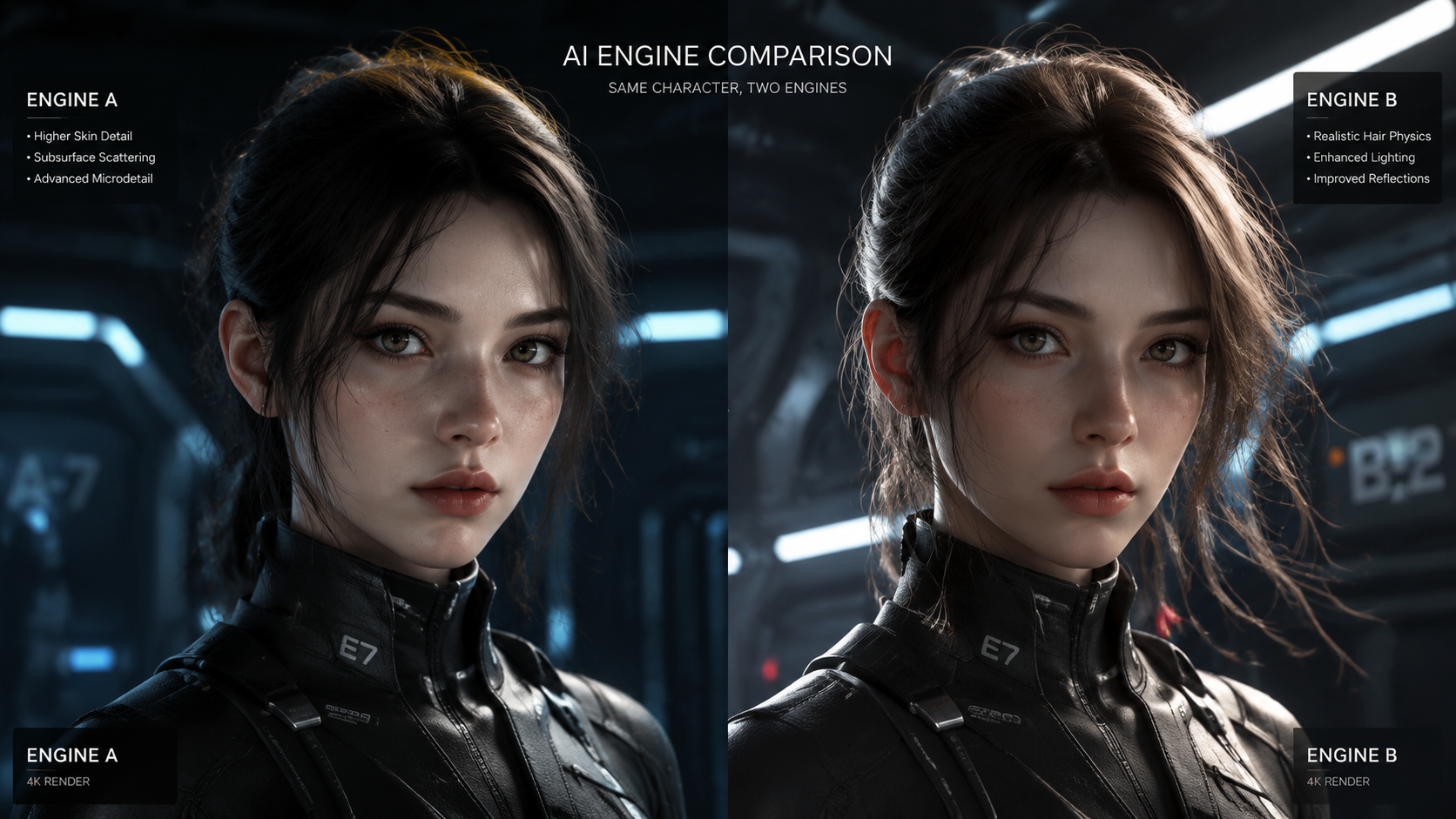
When conducting a runway vs pika labs comparison, the technical capabilities of the underlying models are paramount. Runway’s Gen-3 and Gen-4 architectures are built on a "General World Model" philosophy, which attempts to understand the physical laws of the real world. This results in lighting and shadows that react realistically to moving objects. For professional editors, Runway’s ability to export in ProRes and provide alpha channel backgrounds (Green Screen tool) makes it an unbeatable asset in a standard VFX workflow.
Pika Labs has focused its 2026 updates on the auditory experience. Pika’s "Sound Effects" (SFX) feature uses AI to analyze the visual motion in a clip and generate a matching audio track—the sound of a car revving, waves crashing, or a sword clashing—automatically. As noted by Cybernews in their 2026 In-Depth Review, this integrated audio-visual approach gives Pika a slight edge for creators who want a "one-click" solution for social media content where sound is half the experience.
| Feature | Runway (2026) | Pika Labs (2026) |
|---|---|---|
| Max Resolution | 4K Ultra HD (Upscaled) | 4K Ultra HD (Upscaled) |
| Primary Strength | Photorealism & Control | Physics & Character Style |
| Audio Tools | Lip Sync & Voiceover | Integrated SFX & Lip Sync |
| Motion Control | Multi-Motion Brush (Advanced) | Physics Effects (Crush, Melt) |
| User Interface | Professional Web Suite | Web & Discord Integration |
| Best For | Commercials & Film | Animation & Social Media |
Professional Workflows: Why Runway Leads in Control
For the professional filmmaker, the runway vs pika labs comparison often ends with Runway’s superior control tools. The "Director Mode" in Runway allows users to adjust camera parameters such as zoom, pan, tilt, and roll with numerical precision. This level of granularity is essential when matching an AI-generated shot with existing live-action footage. Furthermore, Runway’s "Custom Model Training" allows studios to train the AI on their own characters or art styles, ensuring a consistent look across an entire feature film or ad campaign.
Runway’s ecosystem also includes "Gen-1" (Video-to-Video), which remains the industry standard for rotoscoping and style transfer. If you have a video of a person walking and want to turn them into a robot while keeping the exact movement, Runway’s depth-aware processing handles this with fewer artifacts than Pika. Tom’s Guide reported in July 2025 that Runway’s processing speed has improved by 40% year-over-year, making it one of the fastest high-end generators on the market in 2026.
Key Runway Features for 2026
- Multi-Motion Brush: Assign different directions and speeds of movement to up to five different areas in a single frame.
- Advanced Inpainting: Remove or replace any object in a video with a simple text prompt, maintaining the background integrity.
- Story Engine: A collaborative tool that helps storyboard and generate sequences based on a master script.
Creative Versatility: Why Pika Labs Wins on Style
Pika Labs has carved out a massive following by prioritizing the "fun" and "creative" aspects of AI video. In a runway vs pika labs comparison of artistic flexibility, Pika often wins because its model is less "rigid." It excels at 2D animation, 3D render styles, and anime. The Pika 2.5 update introduced "Dynamic Canvas," which allows users to expand the frame of a video (outpainting) while the video is playing, creating mind-bending infinite zoom or pan effects that are difficult to replicate in Runway.
The "Lip Sync" feature in Pika is also widely considered more expressive in 2026. While Runway’s lip sync is technically accurate, Pika’s version incorporates more facial emotion and micro-expressions, which is vital for character-driven storytelling. According to No Film School, Pika’s ability to interpret "vibe" prompts—where the user describes a mood rather than a literal action—makes it a more intuitive partner for the initial "blue-sky" phase of creative brainstorming.
Key Pika Labs Features for 2026
- Pika Effects: One-click physics animations like "Cake-ify," "Deflate," or "Explode" applied to any object.
- Style Reference: Upload a single image to dictate the exact aesthetic, color palette, and lighting of your entire video.
- Sound-to-Video: A 2026 beta feature that allows video motion to be driven entirely by the beat and frequency of an uploaded audio track.
The Impact of Competition: Sora, Veo, and the 2026 Market
The runway vs pika labs comparison does not exist in a vacuum. As Mashdigi highlighted in mid-2025, the entry of OpenAI’s Sora and Google’s Veo 3 has pushed both Runway and Pika to innovate faster. To stay competitive, Runway has focused on its "Creative Partners" program, integrating directly with Adobe Premiere Pro and DaVinci Resolve. This makes Runway a "plugin-like" experience for professionals who don't want to leave their primary editing environment.
Pika Labs has responded by doubling down on the creator economy. Their mobile app, launched in late 2025, allows for "on-the-go" generation and direct publishing to platforms like TikTok and Instagram. In 2026, Pika remains the leader in the "Prosumer" category—users who want high-quality results without needing a degree in cinematography. Studies show that Pika's user retention is driven by its community-centric features, such as shared prompt libraries and collaborative "remix" threads.
Final Verdict: Which Tool Should You Use?
Ultimately, the runway vs pika labs comparison reveals two platforms that are increasingly specialized. You should choose Runway if you are working on a professional project that requires precise camera movements, high photorealism, and integration with professional editing software. It is the powerhouse for those who need to control every pixel and ensure that the AI follows a strict directorial vision.
You should choose Pika Labs if your focus is on animation, social media content, or experimental storytelling. Its superior physics engine and integrated sound effects make it a more "complete" standalone creator tool for those who want to turn an idea into a finished, sounding video in minutes. In 2026, the most successful creators are often using both: Runway for the heavy lifting of cinematic scenes and Pika for the stylized, character-heavy sequences that require a touch of creative flair.
Is Runway or Pika Labs better for photorealism in 2026?
Runway is generally considered superior for photorealism. Its Gen-4 model is specifically trained on cinematic datasets, resulting in more accurate skin textures, lighting, and environmental reflections compared to Pika.
Can I use Pika Labs for free?
Pika Labs offers a tiered credit system. While there is a daily "refill" of free credits for basic use, high-definition 4K exports and the latest physics effects typically require a Pro subscription in 2026.
Which tool is better for lip-syncing?
While both are excellent, Pika Labs is often preferred for character-driven lip sync because it captures more emotional nuance in the face. Runway's lip sync is highly stable and better suited for professional corporate or documentary-style "talking heads."
Do Runway and Pika videos have watermarks?
Free tier users on both platforms will have watermarks on their exports. These are removed once you subscribe to any of their paid monthly or annual plans.
Can I generate full-length movies with these tools?
In 2026, you cannot generate a 90-minute movie with a single prompt. However, both tools are used to create the individual shots (ranging from 4 to 16 seconds) that are then stitched together in an editor like Premiere Pro to create long-form content.


Comments ()