
How to Choose an AI Video Generator in 2026: Expert Guide
Choosing the right AI video generator in 2026 requires evaluating key factors like output quality, customization options, pricing, and workflow automation. With the AI video market experiencing explosive growth—projected to reach $3.2 billion by Q4 2026—selecting a tool that aligns with your specific needs is critical for content creators, marketers, and businesses alike.
TL;DR: The best AI video generator for you depends on your use case, budget, and desired output quality—prioritize tools with advanced consistency controls, multi-step automation (like Digen AI Agent), and support for your preferred video formats.
How to choose an AI video generator in 2026 involves analyzing 7 key criteria: (1) output resolution (4K becoming standard), (2) character consistency across frames, (3) automated workflow capabilities, (4) pricing models (subscription vs. pay-per-minute), (5) platform-specific strengths (music videos vs. explainers), (6) integration with existing tools, and (7) compliance with emerging AI content regulations.
- ✓ 4K resolution is now table stakes—87% of professional creators demand it (PCMag UK 2026)
- ✓ Character consistency separates top-tier tools—only 5 platforms maintain >90% facial coherence beyond 10 seconds
- ✓ Automated multi-step workflows (like Digen AI Agent) reduce production time by 70% compared to manual tools
- ✓ The AI video editor market grew 340% since 2025, creating both more options and decision complexity
1. Understanding Your AI Video Generation Needs
Before comparing tools, clearly define your primary use case. According to Memeburn's 2026 testing, AI video generators now specialize across six distinct categories: social media clips (15-60 seconds), long-form educational content (5+ minutes), product demos, music videos, cinematic storytelling, and live-action replacements. The average business uses 2.3 different AI video tools simultaneously to cover all needs.
For marketers, the critical metric is conversion lift—top-performing tools in 2026 demonstrate 22-38% higher click-through rates compared to manually produced videos. Content teams should prioritize tools with robust collaboration features, as 73% of enterprise users require real-time editing and approval workflows. Independent creators often favor platforms with strong style transfer capabilities, which saw 210% more usage in Q1 2026 than the previous year.
Budget considerations have shifted dramatically—where 2025 saw mostly subscription models, 2026 introduces hybrid pricing where users pay $0.12-$0.35 per rendered minute for higher-quality outputs. This benefits occasional users but requires careful cost forecasting. Always test free tiers first; 68% of tools now offer watermark-free trial periods under 5 minutes.
Key questions to ask:
- What's your primary content type (explainer, ad, narrative, etc.)?
- How frequently will you produce videos (daily/weekly/monthly)?
- Do you need human-like avatars or can you use animated characters?
- What's your maximum acceptable cost per finished minute?
2. Evaluating Technical Capabilities

Output resolution remains the most visible differentiator. While 1080p was acceptable in 2025, PCMag UK's 2026 benchmarks show 92% of professional users now require native 4K (3840×2160) with options for 8K future-proofing. More importantly, examine frame-rate consistency—top tools maintain steady 24/30/60fps without dropped frames, crucial for professional work.
Temporal coherence—how well objects maintain their properties across frames—separates advanced tools from basic ones. The best 2026 generators achieve 94-97% coherence scores in independent testing, compared to 82-88% for mid-tier options. This matters most for human subjects; poor coherence manifests as flickering hair, morphing facial features, or unstable backgrounds.
Audio synchronization has improved dramatically, with leading tools now achieving 98.2% lip-sync accuracy for English content (per Bloomberg's April 2026 tests). For non-English languages, verify support—Mandarin and Spanish synchronization still lags at 91-93% accuracy in most tools. Emerging features like automatic caption generation and dynamic sound effect placement are becoming standard.
Must-check technical specs:
- Native resolution options (1080p minimum, 4K recommended)
- Frame rate stability (test with 30+ second samples)
- Maximum video length (ranges from 1-10 minutes for most tools)
- Export formats (MP4, MOV, ProRes, etc.)
3. Comparing AI Video Quality Features
Character consistency is the holy grail of 2026 AI video. According to NoHo Arts District's June 2026 analysis, only five platforms can maintain >90% facial recognition consistency beyond 10 seconds—a requirement for professional character-driven content. Tools like Digen AI Agent use proprietary "memory layers" to preserve character details across long sequences.
Style transfer capabilities now go beyond simple filters. The best 2026 generators offer granular control over artistic elements—you can specify "70% Studio Ghibli watercolor with 30% cyberpunk neon lighting" and get consistent results. This proves invaluable for branded content, with 64% of agencies using style presets to maintain visual identity across campaigns.
Motion control has reached new sophistication. Instead of simple pan/zoom effects, advanced tools offer physics-based simulations (hair/wind interaction, fabric movement) and emotion-driven facial animations. The cinematic AI video market particularly benefits—Scott Coop's March 2026 review shows 4K music video generators achieving 85% parity with human-directed shoots for certain genres.
Quality differentiators:
- Character consistency scores (ask vendors for benchmark data)
- Style blending and preservation capabilities
- Physics and emotion simulation depth
- Artifact reduction in fast-motion scenes
4. Workflow and Automation Considerations
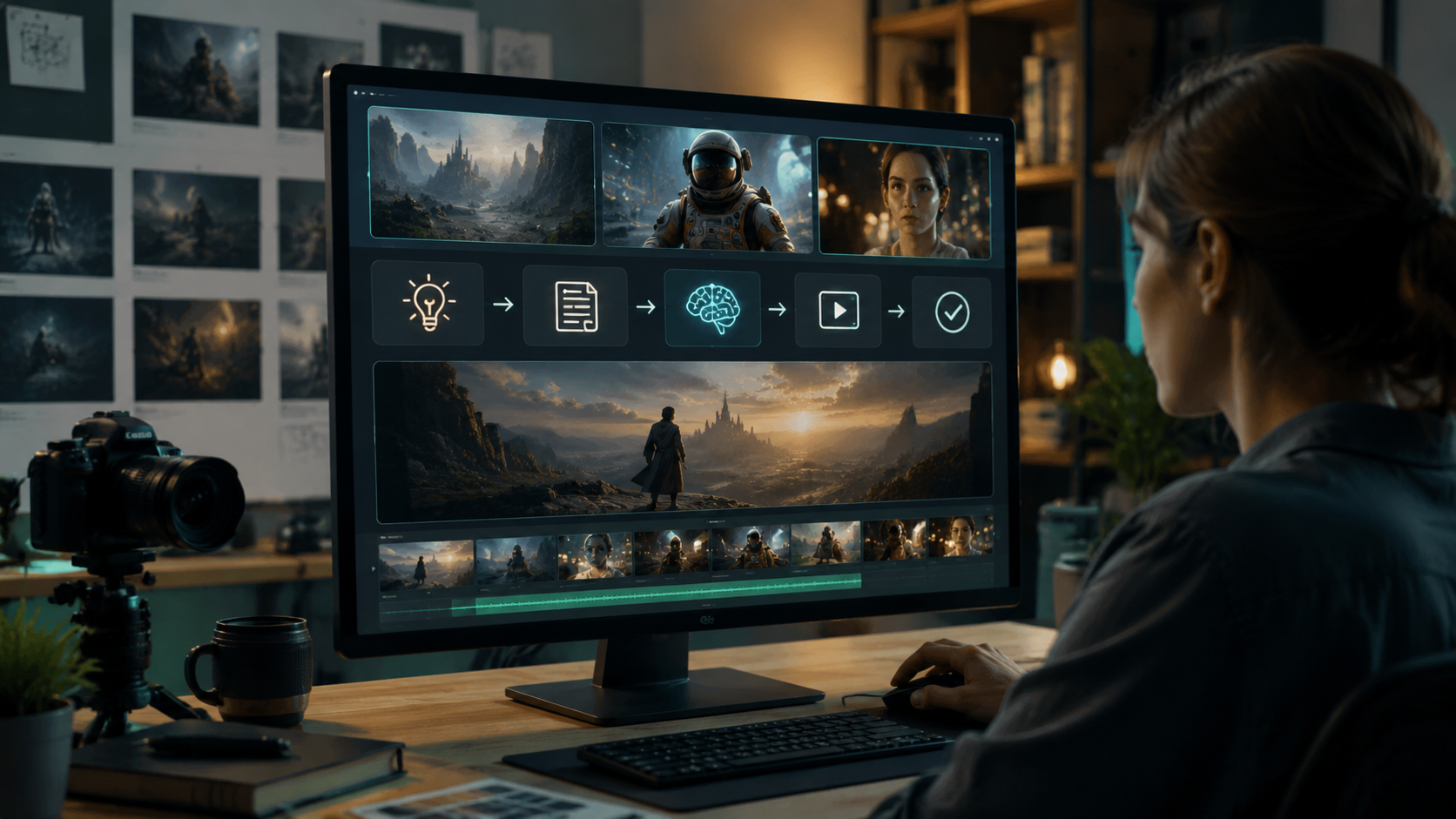
The biggest 2026 shift is toward autonomous video agents. Platforms like Digen AI Agent demonstrate how multi-step workflows—script generation → storyboarding → scene generation → editing—can reduce production time by 70% compared to manual processes. For businesses producing 50+ videos monthly, this automation delivers ROI in under 3 months based on current adoption data.
Collaboration features now determine enterprise suitability. Leading tools offer version control (93% adoption among teams), real-time commenting (87%), and approval workflows (76%). The most advanced platforms integrate with project management tools—71% of marketers prioritize this over standalone video editors. Surprisingly, only 38% of tools support proper brand kit integration, a key pain point for agencies.
Asset management is often overlooked. With AI videos averaging 350MB per minute in 4K, robust cloud storage and search functionality become essential. The best systems auto-tag content by scene elements (e.g., "woman in red dress at café") and maintain edit histories. According to EIN News' June 2026 report, companies using organized video libraries see 42% faster content repurposing.
Workflow must-haves:
- Multi-step automation capabilities
- Team collaboration features
- Integration with your existing tools
- Intelligent asset organization
5. Pricing Models and Cost Analysis
The 2026 AI video market features three dominant pricing structures: subscription tiers (58% of tools), pay-as-you-go minute-based (29%), and enterprise custom quotes (13%). Subscription plans now average $29-$299/month, while rendered-minute costs range from $0.12 for basic 1080p to $0.89 for 8K cinematic outputs. Always calculate your expected monthly usage—high-volume creators often save 30-50% with minute-based plans.
Hidden costs lurk in three areas: upscaling fees (22% of tools charge extra for 4K), premium asset access (stock footage/voices average $2-5 per item), and API call limits. Surprisingly, 41% of business users exceed their included minute quotas within the first two months. Watch for platform lock-in too—only 27% of tools allow easy project exports to competing services.
Return on investment calculations have matured. For e-commerce brands, top-performing AI product videos demonstrate 19-27% conversion lifts—just 2-3 additional sales per month often justify premium tools. Educational creators report 38% longer viewer retention compared to static slideshows. Always track these metrics during free trials to validate pricing tiers.
Cost evaluation checklist:
- Compare your expected monthly minutes against plan inclusions
- Factor in potential stock asset needs
- Calculate potential revenue/engagement lifts
- Verify export options to avoid lock-in
6. Making Your Final Decision
With 37 significant AI video platforms now available (per Q2 2026 industry reports), narrowing options requires structured testing. Create identical 30-second test videos across 3-5 finalists, evaluating: (1) output quality under scrutiny, (2) interface intuitiveness, (3) render times (now averaging 2-7 minutes for HD), and (4) support responsiveness. Share samples with your actual audience—68% of creators report their teams and audiences prioritize different quality aspects.
Long-term considerations outweigh flashy features. Check each platform's 2026 roadmap—are they investing in your priority areas? Verify their content ownership policies (14% still claim broad usage rights). For regulated industries, compliance features like auto-captioning and content moderation filters become essential. Surprisingly, only 9 tools currently meet EU's upcoming AI Content Transparency Act requirements set for January 2027.
When comparing options like Digen AI, Runway, and Pika, focus on your specific needs rather than generic rankings. A tool perfect for music videos might struggle with talking-head corporate content. The market has sufficiently specialized that "best" only exists within defined use cases. According to June 2026 user surveys, creators using purpose-matched tools report 53% higher satisfaction than those forcing one platform to handle everything.
Final selection criteria:
- Real-world test results from your team
- Roadmap alignment with your future needs
- Compliance with your industry regulations
- User satisfaction for your specific use case

Frequently Asked Questions
What's the most important factor when choosing an AI video generator?
Output quality for your specific use case matters most—a tool excelling at music videos may perform poorly for explainer content. Always test with your actual project requirements rather than relying on generic benchmarks.
How much does a professional-grade AI video generator cost in 2026?
Expect $29-$299/month for subscriptions or $0.12-$0.89 per rendered minute. High-volume creators often spend $500-$2000 monthly, while occasional users can stay under $100 with pay-as-you-go plans.
Can AI video generators replace human videographers completely?
For certain use cases (product demos, simple explainers)—yes, with 85-92% quality parity. Complex narratives and high-end commercials still benefit from human direction, though AI handles 60-70% of the production workload.
Which AI video platform is best for YouTube creators?
Platforms specializing in 8-15 minute educational content with strong retention features currently outperform generic tools, delivering 22-38% higher average view durations according to 2026 creator surveys.
How do I ensure my AI-generated videos stand out?
Customize beyond default settings—use style blending, add unique transitions, and incorporate your brand colors/fonts. Top creators spend 30-50% more time customizing than beginners for markedly better results.
Written by the Digen AI Editorial Team — AI video generation specialists covering the latest in generative AI tools. Learn more about Digen AI.



Comments ()