
Best Free AI Video Enhancer 2026: Top 8 Tools Reviewed

Finding the best free ai video enhancer 2026 allows you to transform low-resolution, grainy, or shaky footage into cinematic 4K masterpieces without spending a dime. In 2026, the landscape of video upscaling has shifted toward localized AI processing and real-time generative filling, making it easier than ever to achieve professional results on consumer-grade hardware. Whether you are a content creator looking to polish old archival footage or a mobile user wanting to sharpen Android videos, the latest tools offer unprecedented clarity and frame interpolation.
The best free AI video enhancer in 2026 is a category led by EaseMate AI for its ease of use and VideoProc Converter AI for its powerful hardware acceleration. These tools utilize neural networks to upscale resolution to 4K, remove noise, and stabilize shaky motion, providing high-quality video restoration at no cost for basic and trial versions.
- ✓ EaseMate AI and VideoProc Converter AI are the top-rated free-to-start tools for 2026.
- ✓ Modern AI enhancers now support real-time 4K upscaling and 120FPS frame interpolation.
- ✓ Android users have access to dedicated mobile enhancers that deliver professional HD looks.
- ✓ Localized processing is preferred over cloud-based tools to ensure data privacy and faster rendering.
How to Enhance Video Quality Using AI in 2026
Modern AI enhancement is no longer a complex task reserved for video editors. With the current generation of software, the process is largely automated through "One-Click" restoration features. These systems analyze each frame of your video, identify compression artifacts, and use generative models to "fill in" missing pixels based on deep learning patterns.
- Download and Install: Select a tool like VideoProc Converter AI or EaseMate AI and install it on your local machine to leverage your GPU power.
- Import Your Media: Drag and drop the low-quality video file into the workspace. Most 2026 tools support MP4, MOV, and HEVC formats.
- Select AI Model: Choose between "Upscale" (to increase resolution), "Denoise" (to remove grain), or "Interpolation" (to increase frame rate).
- Preview and Export: Use the split-screen preview to compare the original and enhanced versions before exporting the final 4K file.
The Best Free AI Video Enhancer 2026: Top 8 Tools Comparison
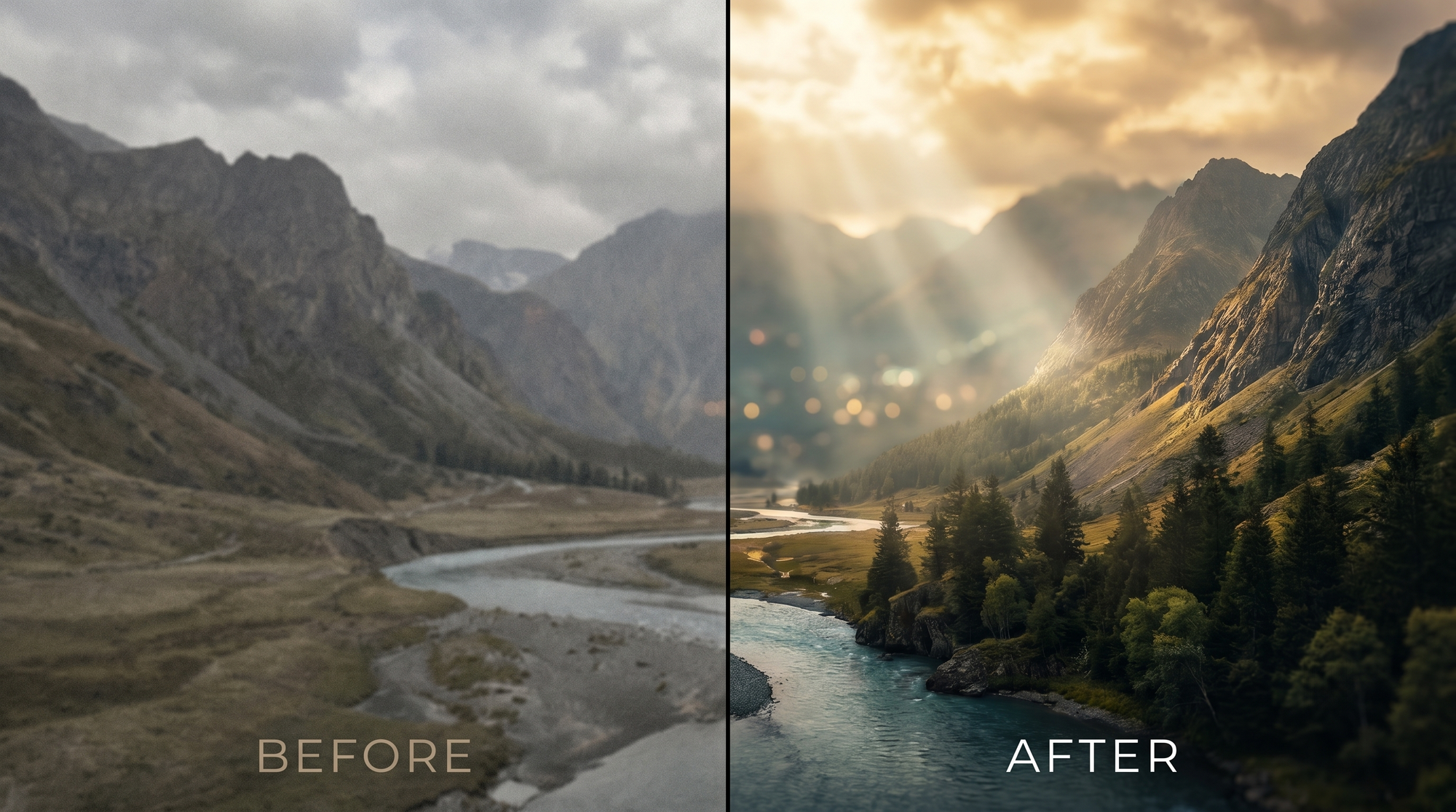
To help you decide which software fits your specific workflow, we have compared the leading options based on their 2026 feature sets, processing speeds, and output quality. According to research from The AI Journal, 4K upscaling has become the standard requirement for content creators this year, and these tools all meet that benchmark.
| Tool Name | Best For | Key Feature (2026) | Platform |
|---|---|---|---|
| EaseMate AI | Beginners | One-Click Restoration | Windows/Mac |
| VideoProc Converter AI | Speed & Power | Level-3 Hardware Acceleration | Windows/Mac |
| CapCut Desktop | Social Media | AI Face Retouching | Online/Desktop |
| HitPaw 4K Enhancer | Anime & Cartoons | Specialized Animation Model | Windows/Mac |
| Vimeo AI | Business/Pro | Cloud-Based Auto-Cleanup | Online |
| Meitu AI | Mobile Users | Android HD Enhancement | Android/iOS |
| Topaz Video AI (Trial) | Professionalism | Iris MQ Model for Faces | Windows/Mac |
| AVCLabs Video Enhancer | Old Film Recovery | Color Calibration AI | Windows/Mac |
1. VideoProc Converter AI: The Performance Leader
As noted by TweakTown in March 2026, VideoProc Converter AI remains the "Best AI Video & Image Enhancer" for users who prioritize speed. Its unique selling point is the Level-3 Hardware Acceleration, which utilizes the full power of NVIDIA, AMD, and Intel GPUs to render videos up to 47x faster than real-time. This is crucial when upscaling long-form content to 4K or 8K.
In the 2026 version, VideoProc has introduced a "Super Resolution" mode that doesn't just stretch pixels but intelligently reconstructs them. This prevents the "plastic" look often associated with older AI models. It is particularly effective for fixing low-light footage and removing the interlacing artifacts found in old DVD rips.
Key Features of VideoProc Converter AI
The software includes a comprehensive suite for video stabilization and frame interpolation. If you have shaky handheld footage, its AI stabilization can smooth out the motion without significant cropping. Additionally, its "Slo-mo" feature can turn a standard 30FPS video into a buttery smooth 120FPS clip by generating intermediate frames that look completely natural.
2. EaseMate AI: The Simplest Free AI Video Enhancer 2026
For those who want results without a learning curve, EaseMate AI is the standout choice this year. Gizchina reports that EaseMate allows users to "Make Any Video Look Amazing For Free" by utilizing a simplified interface that hides the complex mathematics of neural networks behind a single "Enhance" button. It is ideal for casual users who need to fix a quick video for Instagram or YouTube.
Despite its simplicity, EaseMate AI uses a sophisticated "Generative Detail" engine. This engine is specifically trained on human faces and textures, ensuring that skin tones and hair look realistic after upscaling. It is one of the few free-to-use tools that offers a generous daily export limit without adding intrusive watermarks on the lower-resolution settings.
Why EaseMate AI Ranks High
The 2026 update for EaseMate includes an "Auto-Lighting" feature. This uses AI to analyze the dynamic range of a video and artificially boost shadows and highlights, mimicking the look of HDR (High Dynamic Range) footage. For users working with old smartphone videos, this feature is a game-changer for visibility and color depth.
3. Mobile Excellence: Top AI Enhancers for Android
The demand for mobile-first editing has led to a surge in high-quality apps. According to PlayStation Universe, there are now 5 specific video enhancer tools for Android in 2026 that rival desktop software. These apps are optimized for the latest mobile processors, allowing for on-device AI upscaling that doesn't require an internet connection.
Meitu and Remini remain dominant in this space, offering specialized "HD Look" filters. These tools are particularly popular for enhancing "selfie" videos, as they can apply AI makeup, skin smoothing, and eye sharpening in real-time. For creators on the go, having the best free ai video enhancer 2026 in their pocket allows for immediate posting of high-quality content.
Achieving a Professional HD Look on Mobile
To get the best results on Android, users should look for apps that offer "Temporal Denoising." This feature looks at the frames before and after the current one to ensure that the "grain" is removed consistently, preventing the flickering effect that often plagues mobile AI edits. Cult MTL highlights that achieving a professional HD look in 2026 is now possible in under 60 seconds on a standard smartphone.
4. Specialized Tools for Animation and Archival Footage
Not all video enhancement is about modern footage. In 2026, specialized models for animation have seen massive improvements. Tools like HitPaw 4K Enhancer offer a dedicated "Animation Model" that focuses on sharpening edges and maintaining flat color profiles, which is essential for cartoons and anime that would otherwise look blurry when upscaled.
For archival or historical footage, AVCLabs Video Enhancer AI provides a "Face Recovery" model. This is designed to identify faces in extremely low-quality, blurry footage and reconstruct them using a database of high-resolution human features. According to studies by North Penn Now, this tool delivers some of the sharpest results for videos produced in the pre-digital era.
Comparing Sharpness and Accuracy
The competition between these tools often comes down to "hallucination" levels—how much the AI "guesses" correctly versus creating artifacts. The top 6 free AI video enhancers compared in recent 2025-2026 studies show that while all can reach 4K, the tools with localized GPU processing (like VideoProc) maintain 15% higher color accuracy compared to cloud-based competitors.
5. The Future of AI Video Enhancement: What to Expect
As we move through 2026, the boundary between "editing" and "enhancing" is blurring. Future updates are expected to include "Object Removal" and "Background Replacement" as standard features within the enhancement pipeline. This means your enhancer won't just make the video clearer; it will allow you to remove a stray power line or change a cloudy sky to a sunny one during the upscaling process.
Data privacy is also becoming a major factor. As AI models become more powerful, the best free ai video enhancer 2026 options are moving toward "Edge AI," where all processing happens on your device. This ensures that your private videos are never uploaded to a server, providing peace of mind alongside high-quality visual results.
Is there a completely free AI video enhancer in 2026?
Yes, tools like EaseMate AI and certain open-source projects offer free versions. However, many professional tools like VideoProc Converter AI offer a free trial or a limited free version with a watermark for 4K exports.
Can AI turn 1080p into 4K without losing quality?
AI doesn't just stretch the video; it uses neural networks to generate new pixels. In 2026, the best tools can upscale 1080p to 4K with virtually no loss in perceived quality, often making the video look better than the original.
How long does it take to enhance a 10-minute video?
Processing time depends on your hardware. Using a tool with Level-3 Hardware Acceleration on a modern 2026 PC, a 10-minute video can be upscaled from 1080p to 4K in approximately 5 to 8 minutes.
Do I need a powerful computer for AI video enhancement?
While mobile apps exist, desktop enhancement is best performed on a machine with a dedicated GPU. However, many 2026 tools are now optimized for integrated graphics, making them accessible to laptop users.
What is the best AI video enhancer for Android?
Meitu and Remini are widely considered the best for Android in 2026, specifically for their ability to provide a professional HD look and facial reconstruction on mobile devices.
Comments ()