
10 Best AI Scene Editors 2026: Top Tools for Cinematic Video
The best AI scene editors 2026 provide filmmakers and content creators with the ability to manipulate video environments, remove complex objects, and generate cinematic lighting using generative artificial intelligence. These tools have evolved from simple filters to sophisticated engines capable of recreating entire backgrounds and maintaining temporal consistency across high-definition frames. As we navigate through 2026, the integration of AI into the post-production workflow has become the standard for achieving studio-quality results on a creator's budget.
The best AI scene editors 2026 are specialized software platforms that utilize neural networks to analyze, modify, and enhance video sequences. These tools allow editors to perform advanced tasks such as automated object removal, 3D scene reconstruction, and dynamic lighting adjustments with minimal manual masking, significantly reducing the time required for professional-grade cinematic output.
- ✓ Advanced object removal and background recreation are now standard features in 2026 AI suites.
- ✓ Real-time cinematic lighting and atmospheric effects can be applied to flat footage using depth-aware AI.
- ✓ Integration with major streaming platforms, such as Netflix’s proprietary toolset, is bridging the gap between pro and consumer tech.
- ✓ Temporal consistency has been solved, eliminating the "flicker" common in earlier generative video iterations.
How to Use the Best AI Scene Editors 2026 for Cinematic Results
Mastering the landscape of modern video editing requires a shift from manual keyframing to prompt-based and selection-based workflows. The current generation of tools focuses on understanding the three-dimensional space within a two-dimensional frame. By leveraging the power of the best AI scene editors 2026, you can transform a simple backyard shot into a sprawling sci-fi landscape or a moody noir set without leaving your desk.
- Upload and Analyze: Import your raw footage into the AI editor to allow the neural engine to map depth, identify objects, and track motion vectors.
- Select Scene Elements: Use "semantic selection" to click on objects you wish to remove, replace, or enhance. The AI handles the masking automatically.
- Apply Generative Fills: Describe the new environment or object you want to insert. For example, "replace background with a neon-lit cyberpunk city at night."
- Adjust Lighting and Depth: Use the depth-map tools to add volumetric fog or change the light source direction to match the newly generated scene elements.
- Export with Temporal Smoothing: Finalize the render using AI upscaling and smoothing to ensure every frame transitions perfectly without artifacts.
The Evolution of Cinematic AI in 2026
The year 2026 marks a turning point in digital storytelling. According to a report by eWeek, Netflix has recently unveiled a groundbreaking AI video editing tool specifically designed to remove objects and recreate scenes with such precision that it can match the grain and texture of original film stocks. This move signifies that AI is no longer just for "viral clips" but is a core component of high-end Hollywood production pipelines.
Furthermore, the accessibility of these tools has expanded. Tech Times recently highlighted that the top 3 AI video generators for beginners in 2026 now offer "one-click cinematic" modes, allowing those without formal training to achieve professional results. This democratization is fueled by the integration of large vision models (LVMs) that understand the physics of light and motion better than ever before.
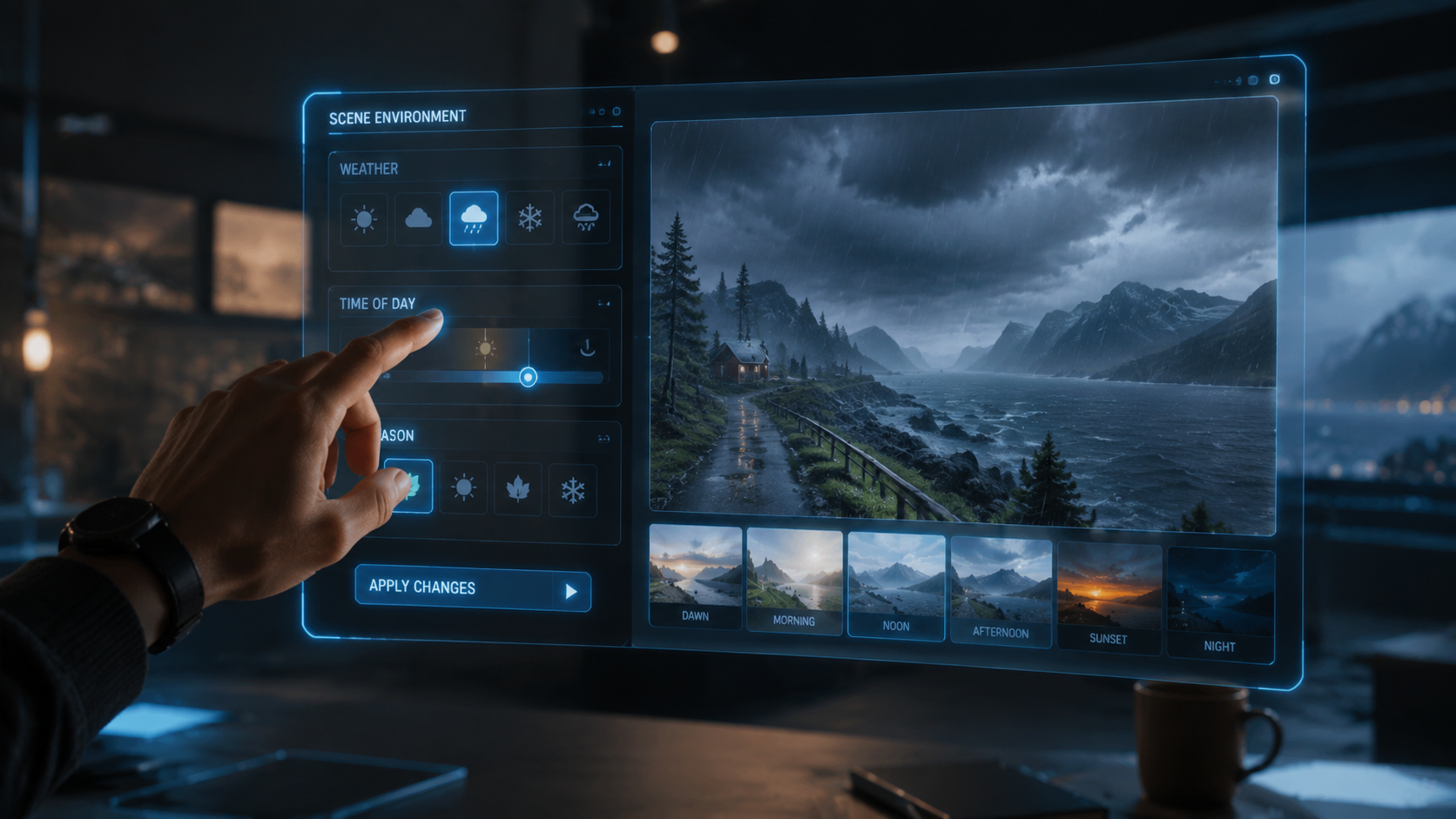
As noted by Geek Vibes Nation in their April 2026 coverage, the most significant "hack" in modern editing is the use of AI to perform "relighting" after the shoot is finished. This allows editors to change the mood of a scene from "golden hour" to "stormy midnight" by simply adjusting a slider, a feat that would have required expensive reshoots just two years ago.
Top 10 AI Scene Editors for 2026 Comparison
Choosing the right tool depends on your specific needs, whether you are a music video director, a YouTuber, or a narrative filmmaker. Below is a comparison of the leading platforms currently dominating the market in 2026.
| Tool Name | Primary Feature | Best For | Price Point |
|---|---|---|---|
| Netflix SceneGen (Pro) | Object Removal & Reconstruction | Feature Films | Enterprise/Studio |
| HighOnScene 2026 | Background Remover | Social Media & Ads | Monthly Subscription |
| Coop-Cinematic | Music Video Generation | Artists & Directors | Pay-per-Render |
| TechStream AI | Beginner-Friendly UI | New Creators | Freemium |
| VibeHacker Pro | Dynamic Relighting | Colorists | One-time License |
| BreakingAC Suite | End-to-End Generation | Rapid Prototyping | Variable Tiers |
| Visionary 5.0 | 3D Environment Mapping | VFX Artists | Professional |
| QuickCut AI | Automated B-Roll Sync | Documentaries | Subscription |
| AtmosEdit | Weather & Atmosphere | Cinematographers | Mid-range |
| NeoNoir AI | Stylized Scene Grading | Indie Filmmakers | Affordable |
Deep Dive: Best AI Scene Editors 2026 Features
1. Netflix SceneGen: The Industry Standard
As reported by eWeek in April 2026, Netflix's entry into the software space has revolutionized how objects are handled in post-production. This tool doesn't just "blur" out an unwanted microphone or extra; it analyzes the surrounding pixels and recreates what should have been behind the object based on the camera's perspective. It is widely considered the gold standard for high-budget scene reconstruction.
2. HighOnScene: The Ultimate Background Remover
According to High On Films, this tool remains the top choice for background removal in 2026. Its edge-detection capabilities are so advanced that it can perfectly isolate strands of hair or translucent materials like glass and smoke. This makes it an essential tool for creators who need to place subjects into entirely new, AI-generated environments without the need for a green screen.
3. Coop-Cinematic: The Music Video Powerhouse
Scott Coop recently identified this as the best AI music video generator for cinematic output in 2026. It specializes in rhythmic synchronization, ensuring that scene transitions and generative visual effects pulse in time with the audio track. The "Cinematic Output" mode ensures that the final export maintains a high bitrate and professional color depth, suitable for large-screen displays.
Why AI Scene Editing is Essential in 2026
The demand for content is higher than ever, and the "best ai scene editors 2026" allow creators to keep up without sacrificing quality. In the past, creating a cinematic look required a massive crew and expensive lighting rigs. Today, the "Top Video Editing Hacks Using AI In 2026" described by Geek Vibes Nation include the ability to simulate different lens types and sensor sizes digitally. You can take footage shot on a smartphone and apply the optical characteristics of a 35mm anamorphic lens with a single click.
Moreover, the integration of "Full Comparison & Honest Guides" from sources like Breaking AC News helps users navigate a crowded market. These guides emphasize that the best tools in 2026 are those that offer "hybrid workflows"—allowing for manual control when needed, while the AI handles the repetitive, labor-intensive tasks like rotoscoping and noise reduction.
According to Tech Times, the efficiency gains are staggering. Editors using AI-assisted scene tools report a 70% reduction in turnaround time for complex VFX shots. This efficiency is why even beginners are now able to produce content that rivals the quality of major studios from just a few years ago.
Future-Proofing Your Workflow with AI
As we look further into 2026, the trend is moving toward "persistent scenes." This means that once an AI editor understands the 3D layout of a location, you can return to that digital "set" at any time to add new characters or change the camera angle. The best ai scene editors 2026 are no longer just editing tools; they are becoming virtual production environments.
Investing time in learning these platforms now is crucial. Whether you are using the beginner-friendly tools recommended by Tech Times or the high-end studio tools unveiled by Netflix, the core skills remain the same: understanding how to prompt the AI and how to refine the output to match your creative vision. The technology is here to augment your creativity, not replace it.
What is the best AI scene editor for beginners in 2026?
According to Tech Times, the top 3 AI video generators for beginners are designed with intuitive interfaces that prioritize ease of use. These tools typically feature drag-and-drop functionality and pre-set cinematic styles that allow new users to achieve professional results without deep technical knowledge.
Can AI scene editors remove moving objects from video?
Yes, tools like the one recently unveiled by Netflix are specifically designed to remove moving objects and seamlessly recreate the background behind them. These editors use temporal analysis to ensure that the fill-in pixels remain consistent throughout the duration of the shot.
Are AI-generated scenes high enough quality for cinema?
Absolutely. In 2026, AI scene editors like Coop-Cinematic and Netflix's proprietary tools offer 8K export options with high dynamic range (HDR) support. They are used extensively in music videos and feature films to enhance or create entire environments that are indistinguishable from real-world footage.
Do I need a powerful computer to run these AI editors?
While some tools offer local processing, many of the best AI scene editors in 2026 are cloud-based. This allows users to perform complex generative tasks on standard laptops, as the heavy lifting is handled by remote servers equipped with high-end GPUs.
Is it possible to change the lighting of a scene after filming?
Yes, one of the top video editing hacks in 2026 involves using AI to relight scenes. By generating a depth map of the footage, the AI can apply new light sources that interact realistically with the objects and people in the frame, allowing for post-production changes to the time of day or mood.



Comments ()